
Visualize Concepts

Marc
·
Jul 29, 2026
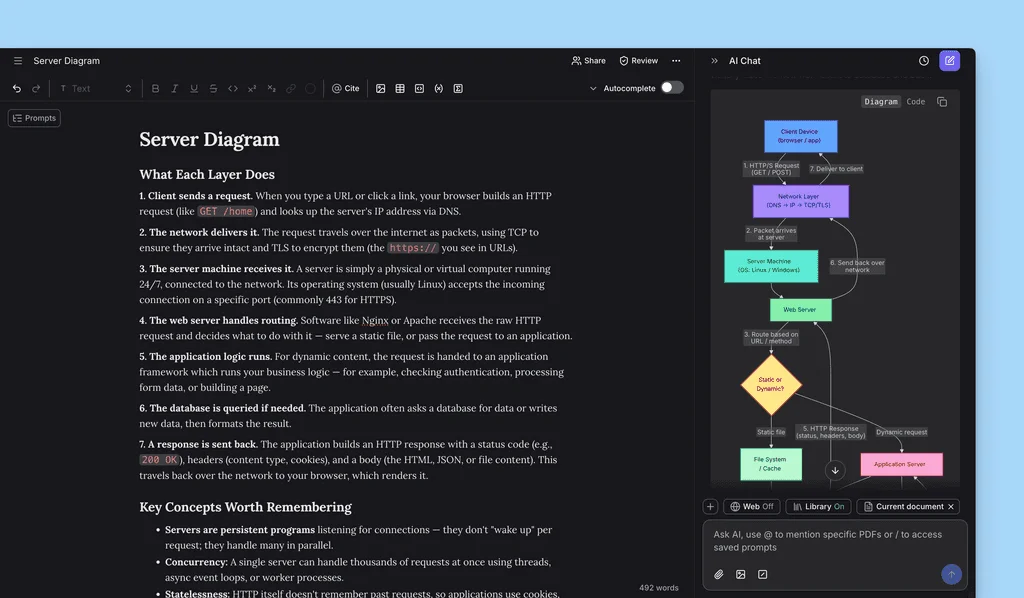
Use AI Chat to visualize concepts or frameworks.
Added
- Ability to create visuals with Mermaid code blocks. Simply ask for a concept visualization in AI Chat, once moved into the editor you can switch between
DiagramandCodeshould you want to make any edits - Ability to change your account email from
Settings → Account - Added the
Cited byandInclude preprintsfilter in the document setup checklist
Changed
- Improvements in AI Chat when handling citation queries
- Turning off
Consider library sourcesnow makes it clearer which collections and sources are actually active - Citation control settings now appear in the same order in the document checklist and Autocomplete settings
- A new loading experience when submitting document prompt while your title, headings, and outline generate
- Autocomplete suggestions are now announced to screen readers, and the cached suggestion previous and next controls are properly labelled
- Further accessibility improvements to keyboard focus in the mobile
+ Newmenu, PDF cursor contrast, and focus handling on interactive elements across the app Documents,Library, andFind Paperssidebars now use the same sliding panel transition on mobile- Inviting a collaborator now updates the invite list immediately instead of only showing a toast for clarity on who you have invited before they join
- The chat source selector is no longer disabled before you have added any sources, and the chat input actions have been reordered
- Improvement in code blocks formatting in
.docxexport and previously breaking.texexport
Fixed
- Library uploads now complete for both manual upload and Zotero import
- Section heading styles are now consistent across the app
- Reference parsing and image extraction on long documents are substantially more reliable, with fewer silent failures, dropped images, and timeouts on large PDFs
- Onboarding hint cards are no longer blurry on mobile devices
- Reference parsing no longer fails on some
.docximport operations - Pasting a copied table from an AI Chat response now keeps its citations
- Code blocks now keep monospace formatting in
.docxexport and no longer break.texexport - Citing while headings are still streaming no longer destroys your outline, the toolbar now waits until the editor is ready
- PDF peek now opens in the document viewer
- The on-screen keyboard no longer reopens on every step of the document checklist
- The prompt strength bar no longer stays weak for Traditional Chinese and Japanese prompts
- Mermaid diagram labels no longer clip, and a stale diagram no longer stays visible after a syntax error
- Various smaller fixes: excessive padding and limited width in the expanded AI Chat composer, onboarding hints not appearing or being clipped on mobile, DOI and ISBN examples not being clickable in
Upload to Library, and the password reset resend link using button instead of link styling