
Charts

Marc
·
Sep 9, 2026
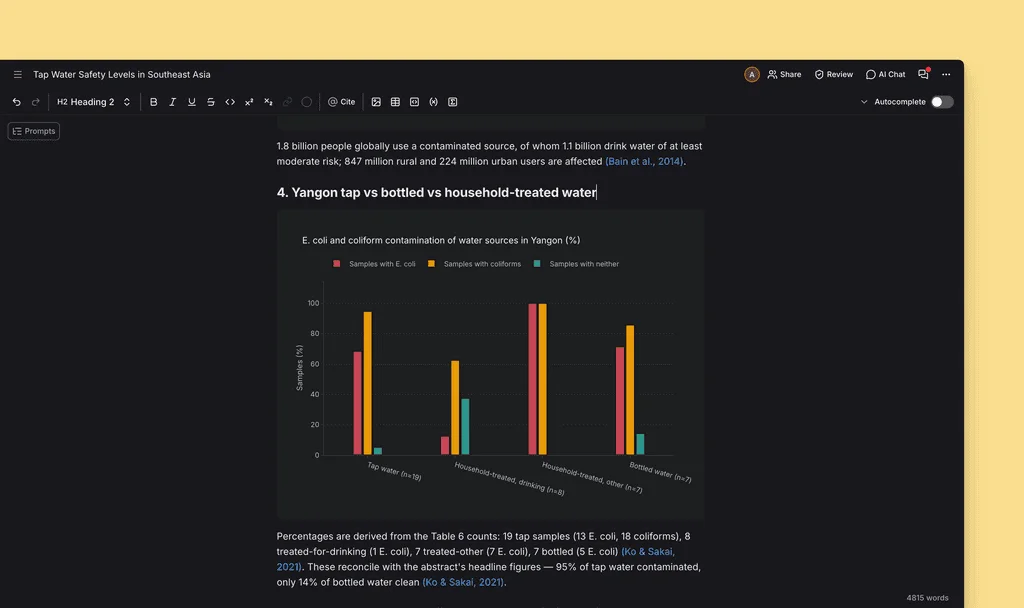
Getting a figure into your draft used to mean building it somewhere else and pasting in a flat image, now you can ask AI Chat to visualise a finding and drop a real chart straight into your document.
Added
- Ability to render charts directly in a document. Grouped and stacked bars, line and trend, scatter with log axes, error bars, 95% confidence bands, box, violin, histogram, forest and funnel plots
- AI Chat can now answer with a chart, so asking it to visualise a result gives you a figure rather than a table
- New
Sourcesbutton in the References panel lists every work cited in your document, and has the option to save them all to a collection in one go - Peer Review comments now carry interactive citations you can open and inspect, in both the comment popover and the sidebar
- A new high contrast theme is now available in
Preferences - Collections are now available in the
@mention popover in AI Chat
Changed
- LaTeX and Word export now carry over bold, italics, headings and lists, with a new export options dialog for choosing presets
- Pasting a DOI into
Citesearch now resolves it to the full reference - AI Chat reads more of your conversation before answering, and compacts very long threads so replies stay on topic
- Peer Review, Claim Confidence and Literature Review now run on the server, so a run keeps going if you refresh or close the tab
- You now get an email notification when a Workflow
Betarun finishes meaning you can close the tab and return later - Document settings, autocomplete settings and
Promptsnow use consistent context and prompt scopes - Workflows
Betaare now available on mobile - The chat
Add contextmenu opens as a drawer on mobile ⌘ + Enternow advances the prompt input in document setup- Clearer, more specific error messages across sign in, sign up and in-app alerts
- Loading skeletons in the sidebar and citation search now match the layout they stand in for
- Improved tone control style guide extraction
Fixed
- Documents you own no longer become inaccessible
- Lag when selecting large amounts of text in the editor
- Ability to update your invoice address and VAT number from the billing portal
- Mixed, nested lists showing multiple active block types
- Picking a second highlight colour now repaints the highlight instead of clearing it
- Comment popovers stay anchored when the editor scrolls, and submitting a comment no longer leaves the selection UI hanging around
- Various
.docximport failures — unreadable files, backend fetch errors, and ODT, PPTX, XLSX and other archives that previously died in the parser now report clearly - Dropping a
.docxonto the editor now triggers the import flow and document setup - Dropping a
.pdfonto the editor triggers upload to library flow - Indigo focus ring on the
.docximport loading dialog - The library list now loads the next batch when you reach the end when adding library sources to a new collection
- Invalid Zotero metadata no longer breaks an import
- Chat citations inside inline-code backticks now render as citations, and Peer Review comments no longer show raw
[CITE N]markers - Long literature reviews no longer truncated when merged
- Removing someone's document access now ends their editing session immediately
- Missing keyboard focus indicators in settings sections, and a white focus ring flash on keyboard focus
- The sign-up password field now triggers the browser strong password suggestion
- Language dropdown in
Preferencesnow matches the sign-up pages - Upload dialog redesigned to fit longer translations
- Pricing dialog opened over Settings no longer blocks scrolling